Fuelio: gas log & gas prices
Sygic.Auto & Vehicles
4.23.60K Reviews
- Version
- 10.3.4
- Installs
- 5.00M
- Age Rating
- Everyone
Screenshots

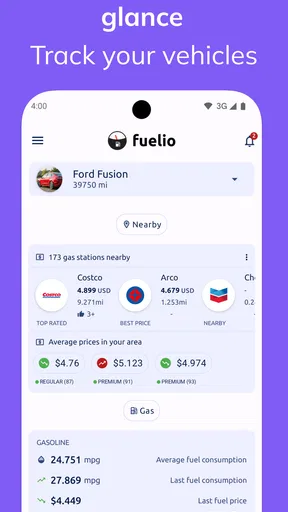
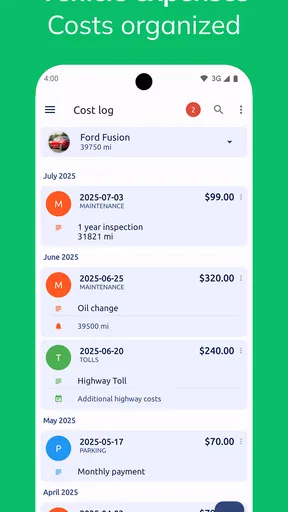
Our Review of Fuelio: gas log & gas prices
 Analysis by Appyee
When I started tracking fuel costs, the problem wasn’t one unusually expensive fill-up; it was that I couldn’t tell what the car was costing me over time. Receipts went missing, odometer readings blurred together, and a vague sense that one station was cheaper than another rarely helped when I actually needed to stop. Fuelio: gas log & gas prices is useful because it turns those scattered details into a record I can check and act on, rather than asking me to remember them.
I’d think of it as a car-management app first and a navigation app second. Its main value comes from logging fuel, mileage and expenses consistently, then using that history to understand a vehicle’s running costs. The nearby price information can help with a decision in the moment, but it works best alongside a habit of recording your own fill-ups.
Start with the car you actually drive
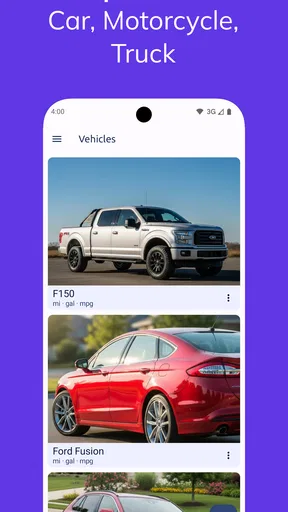
My first practical step would be to add a vehicle and enter its current odometer reading carefully. That starting point matters: future entries are only useful if they belong to the right car and the mileage makes sense. If a household has more than one vehicle, keeping each one separate is more than tidiness; it prevents a high-consumption car from distorting the picture for a more efficient one.
Fuelio is a free app in the Auto & Vehicles category, developed by Sygic. It has a 4.3 average from around 133,000 ratings, and more than five million installs, which suggests it has found an audience among drivers who want practical records rather than a full workshop-management system. The app is rated for Everyone, and optional in-app purchases are listed at $2.99 to $14.99 per item.
Make each fill-up count as a useful entry
After a fill-up, I’d record the amount paid, fuel quantity if I have it, and the odometer reading while the receipt or pump display is still in front of me. This small routine is the difference between a useful log and a screen full of half-remembered numbers. If I only enter a total cost, I can still follow spending, but I lose some of the context needed to compare consumption properly.
For a realistic weekday example, imagine filling the car on the way home and then forgetting the details by the next morning. Entering them before driving away takes the task out of memory and gives the next entry a clear reference point. I’d also keep a photo or paper receipt when a purchase needs to be checked later; a log is convenient, but it is not a substitute for the original proof of payment.
Use the history to answer a better question
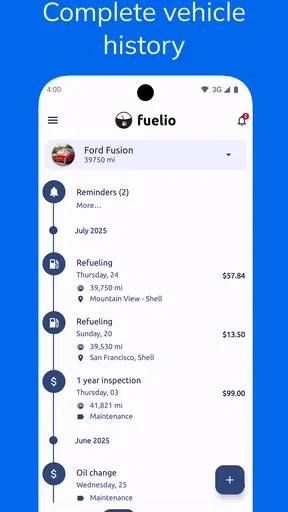
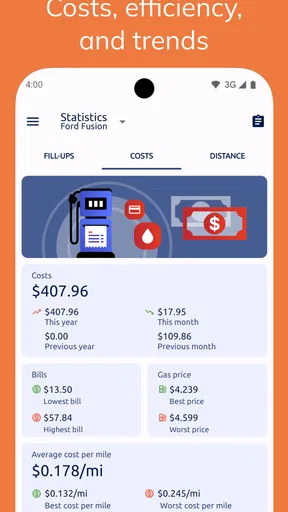
A single tank tells me little about whether my driving has become more economical. Several consistent entries can reveal a longer pattern, which is more useful for planning a monthly car budget or noticing that a vehicle is using more fuel than I expect. I wouldn’t react to one unusual reading: a partial fill, a changed route, or a different mix of city and highway driving can make individual results hard to compare.
One helpful habit is to compare similar periods and similar kinds of driving rather than chasing a perfect number after every trip. If my commute changes, I’d note that mentally before drawing conclusions from the chart or history. The app can organize the record, but I still need to interpret it with ordinary context: weather, traffic, load and route all affect what a tank seems to say.
Check prices without making a detour the goal
When I’m in an unfamiliar area, nearby gas-price information can give me a useful starting point for choosing where to stop. I’d compare a station’s listed price with the distance and direction of travel, not just tap the lowest figure and drive across town. A small saving can disappear in extra miles, time, or an inconvenient route, so the sensible choice is often the cheapest station already close to where I’m going.
Price information is most useful as a prompt to compare, not as a guarantee that every station will suit the trip. If I’m low on fuel or travelling with passengers, convenience and a safe, straightforward stop matter more than finding the absolute minimum. In that sense, Fuelio works best as a decision aid inside a normal journey, not as a reason to reorganize the whole journey around fuel.
Keep the record useful beyond the phone
Fuelio also offers ways to export records and sync them with cloud services such as Google Drive. That is handy if I want to inspect entries on another device, keep a separate copy, or work with a spreadsheet when reviewing costs. I’d make an export part of an occasional routine rather than waiting until I change phones or need an older receipt urgently.
A spreadsheet is still better for someone who wants custom formulas, detailed accounting or a report arranged in a very particular way. The app’s advantage is that it gives everyday drivers a more convenient place to build the raw history first. Exporting is a handoff: Fuelio collects the information, while another tool can take over if I want deeper analysis.
Where the routine can stumble
The main weakness is also the main condition for getting value: I have to keep entering accurate information. Missed fill-ups or inconsistent mileage can make the history less helpful, and no automatic-looking summary can repair a record that was never completed. Drivers who dislike logging purchases may find that a banking app gives them an easier view of total spending, even though it won’t connect each payment to mileage and consumption in the same way.
It’s also worth separating fuel tracking from vehicle maintenance. Fuelio can help me understand fuel costs and mileage patterns, but I wouldn’t treat a fuel log as a complete service record or diagnostic tool. If my main need is turn-by-turn directions, a dedicated navigation app is the more direct choice; if I want to track several types of household spending, a budgeting app may fit better. Fuelio makes the most sense when the question is specifically, “What is this vehicle costing me to run, and how has that changed?”
Who I’d recommend it to
I’d recommend it to drivers who regularly pay for fuel themselves, want to compare running costs over time, or manage more than one vehicle and need separate histories. It can also help someone preparing a household budget: a few months of consistent records are more revealing than trying to estimate fuel spending from memory. For a work vehicle, exports may be useful when checking records, though anyone with formal reimbursement rules should follow those requirements rather than assuming an app log is sufficient documentation.
I’d skip it if I only want directions, rarely drive, or know I won’t maintain a manual log. In those cases, the extra record-keeping may feel like another chore, while a navigation tool or a basic spending tracker answers the immediate need with less effort. The best test is simple: if you’re willing to enter each fill-up soon after it happens, the history can become genuinely useful; if not, its detailed tracking won’t help much.
The current version is 9.20.1, and the app’s roots go back to its release on August 4, 2011. I like that its purpose remains easy to understand: collect vehicle-related numbers and make them easier to review. Before relying on an export or a cloud copy, I’d check that the chosen method is set up as I expect and that the resulting file is readable; a backup is only reassuring when I know where the record ended up.
There are a few practical questions I’d settle during the first week. Can I remember to log a fill-up before leaving the station? Do I want to track one vehicle or several? Is a nearby price comparison useful on my usual routes, or only on occasional trips? Those answers determine whether the app becomes a helpful habit or another icon I stop opening. Starting with one vehicle and a handful of complete entries is a low-effort way to find out.
I would also avoid treating every apparent change in fuel economy as a verdict on the car. A new route or a string of short trips can shift the result, and one incomplete tank can throw off a comparison. The stronger use is spotting a persistent pattern across comparable periods, then deciding whether it calls for a change in driving, a closer look at costs, or simply more consistent logging.
As an app, Fuelio sits between a plain notes file and a full vehicle-management setup. Notes offer flexibility but make calculations and comparisons your job; a bank account shows payments but usually separates them from mileage; a navigation app helps you get somewhere but is not built around a personal fuel history. Fuelio’s trade-off is focused structure: it asks for more deliberate entries than passive tracking, but gives those entries a car-specific context.
Getting Started with Fuelio
First things first, downloading Fuelio is a breeze. It's available on both Android and iOS, so no worries about compatibility. Once you install the app, you're greeted with a clean and intuitive interface. The setup process is straightforward, allowing you to quickly enter your vehicle details. This includes your car's make, model, and odometer reading. It took me just a few minutes, and I was all set to start logging my fuel data.
Tracking Fuel Expenses
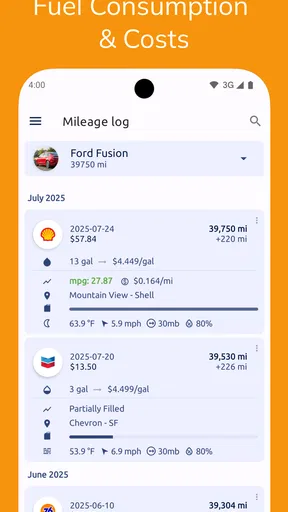
The core feature of Fuelio is its ability to track fuel expenses. Every time you fill up your tank, you can log the details, including the price per gallon, total cost, and mileage. The app then calculates your fuel economy. What I love about this feature is how it helps me become more aware of my driving habits. It's fascinating to see how small changes can lead to better fuel efficiency.
Another cool aspect is the ability to view historical data. You can check out your average fuel consumption over weeks or months, which is great for budget planning. Plus, the app supports multiple vehicles, so if you own more than one car, you can track each separately without any hassle.
Discovering Gas Prices
One of the standout features of Fuelio is its gas price locator. The app shows you the cheapest gas stations nearby, which is a real money-saver. I found it incredibly handy, especially when traveling to unfamiliar areas. The map view is clear, and you can easily compare prices to find the best deals. It's like having a personal assistant scouting for the best fuel prices!
Exporting and Syncing Data
For those who love to keep their data backed up, Fuelio offers easy data export options. You can export your logs to a CSV file or sync with cloud services like Google Drive. This feature ensures that you never lose your data, even if you switch phones. I appreciate this flexibility because it means I can access my records from anywhere.
User Experience
Using Fuelio feels smooth and effortless. The app's design is minimalistic, without any clutter, making navigation a breeze. It’s not bogged down by unnecessary features, focusing instead on delivering a seamless experience for its core functionalities. The app also supports multiple languages, which is a nice touch for international users.
One thing I noticed is that the app runs efficiently without draining my phone's battery, which is always a plus. After using it for a few weeks, it’s clear that Fuelio is designed with user convenience in mind.
Final Thoughts
Overall, Fuelio: gas log & gas prices is a fantastic tool for anyone looking to keep a close eye on their fuel expenses. Whether you're a budget-conscious driver or simply someone who loves data, this app delivers on its promise. It's user-friendly, informative, and even a bit addictive as you start tracking your progress. If you haven't tried it yet, give it a go – your wallet might just thank you!
Verdict
Strengths of Fuelio: gas log & gas prices
- Easy-to-use interface for quick data entry.
- Tracks fuel economy and expenses efficiently.
- Supports multiple vehicles and currencies.
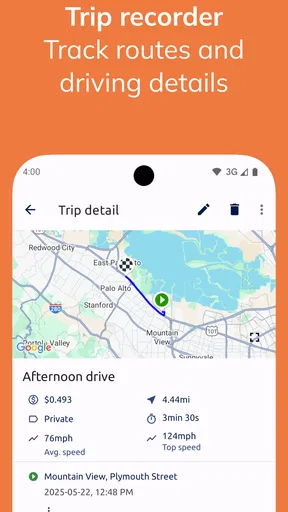
- Integrates GPS for accurate mileage tracking.
- Offline functionality for convenience.
Limitations of Fuelio: gas log & gas prices
- Ads can be intrusive in the free version.
- Limited features without premium upgrade.
- Occasional GPS inaccuracies reported.
- May require manual data input at times.
- No cloud sync in the free version.
Other Releases by Sygic.
View All
Sygic GPS Navigation & Maps
Travel & Local4.2

Sygic GPS Truck & Caravan
Maps & Navigation3.6
Similar Picks in This Category
View All
Android Auto
Google LLC4.1

maxim — order a taxi & food
PT. SITO4.7

Штрафы ГИБДД: проверка с фото
Pays LLC – Штрафы ГИБДД4.7

Номерограм – проверка авто
Авто Ассист4.8

Дром Авто
Дром4.9

Frequently Asked Questions
What features does Fuelio offer for tracking fuel consumption?
Fuelio provides a comprehensive suite of features for tracking your vehicle's fuel consumption, including detailed gas log entries, mileage tracking, and real-time gas price comparisons. It also offers route planning and cost analysis to help you manage your fuel expenses more effectively.
Is Fuelio compatible with multiple vehicles?
Yes, Fuelio supports multiple vehicles, allowing users to track fuel and maintenance records for each vehicle separately. This feature is particularly useful for families with several cars or for individuals managing a fleet of vehicles, ensuring detailed tracking and reporting for each.
How does Fuelio help in finding the cheapest gas prices?
Fuelio integrates a gas price map that shows real-time fuel prices in your area. Users can compare prices at nearby gas stations and choose the most cost-effective option. This feature helps save money by identifying the cheapest refueling options based on your location.
Can I export my Fuelio data for analysis or backup?
Yes, Fuelio allows you to export your data in various formats, such as CSV or Excel, enabling easy analysis or backup. This feature ensures that your valuable data is secure and can be transferred to other devices or applications if needed.
Is Fuelio available offline, and how does it handle data synchronization?
Fuelio functions offline, allowing you to log entries without an internet connection. When you're back online, it syncs your data with cloud services like Google Drive or Dropbox, ensuring your information is always up-to-date and safely stored, even when switching devices.
